ephemeral
adjective/ɛˈfɛ.mə.ɹəl/ tap to copy
-
1
lasting a very short time
the ephemeral joys of childhood
Synonyms
- passing
- short-lived
- transient
- transitory
- fugacious
Offline English dictionary · Android
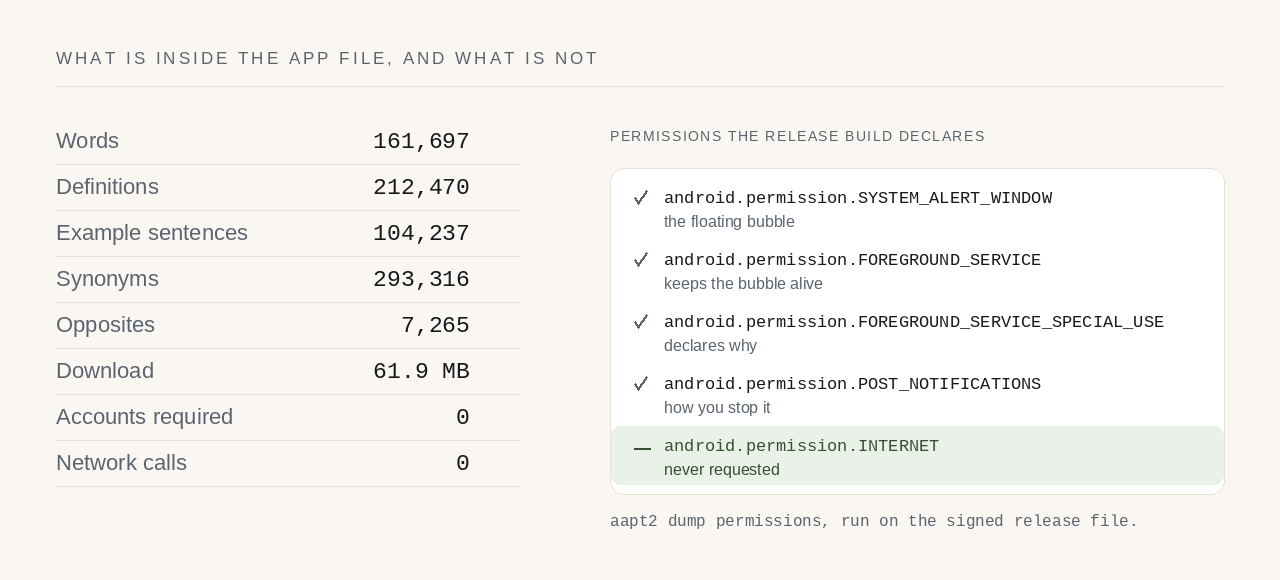
LexiFloat is a free offline English dictionary for Android. All 161,697 words live inside the app file, a floating bubble defines any word on top of whatever you are reading, and the app declares no internet permission — so Android itself, not a privacy policy, is what stops it sending anything anywhere.
Version 1.0.0, in closed testing ·Android 8.0 and later ·61.9 MB ·Free, no account
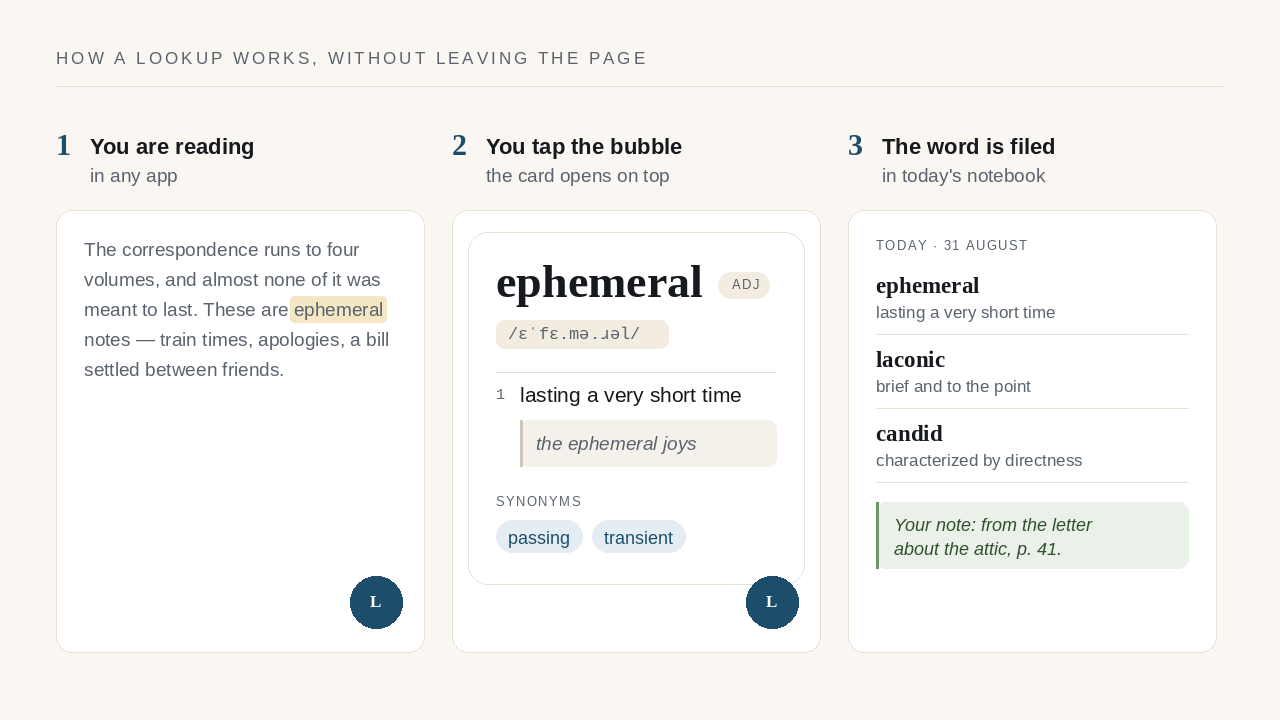
The correspondence runs to four volumes, and almost none of it was meant to last. These are ephemeral notes — train times, apologies, a bill settled between friends — and their survival is an accident of somebody's tidy attic rather than any intention of the people who wrote them.
ephemeral
adjectivelasting a very short time
the ephemeral joys of childhood
Synonyms
How it works
Three steps, and none of them is “switch apps”. The bubble sits at the edge of the screen while you read; tapping it opens a search card over the page you are on; and any word you stay on for three seconds is filed in that day's notebook so you can find it again later. Select-and-look-up from the text menu does the same thing without the bubble.
The promise, and how to check it
Because an offline dictionary does not need one, and leaving it out turns a claim into
something the operating system enforces. An Android app can reach the network only if
it declares android.permission.INTERNET in its manifest. LexiFloat does
not declare it, so there is no code path, no fallback and no exception: the connection
is refused before the app has a say. Most apps ask you to believe a policy. This one
asks you to read a list.
You can run that command against the release file yourself, or take the shorter route: Settings → Apps → LexiFloat → Permissions on your own phone. There is no network entry, because the app never asked for one. The full privacy policy says the same thing at length.
What it does
The bubble
A small dot parks at the edge of the screen and stays out of the way until you tap it. The card opens with the keyboard already up, over your book, your inbox, your PDF. Drag the dot anywhere; it snaps back to the edge and remembers the side. Or skip it entirely: select a word in any app and pick LexiFloat from the text-selection menu.
Search
LexiFloat searches definitions as well as headwords, so typing fear of enclosed spaces gives you the word back. Misspellings are matched against close candidates, and inflected forms resolve to their entry, so running finds run instead of nothing.
Notebooks
A word is filed only once you have read it for three seconds, so typing your way towards antenna does not fill the notebook with ant and ante. Days become notebooks, notebooks take your own notes, and a month of reading turns into something you can look back over.
Practice
A word of the day, a quiz built from your own notebook on a spaced-repetition schedule, and a streak counted from what you actually did rather than stored in a number that can drift. When the notebook runs dry the quiz turns outward and asks about words you have never met, at roughly the level you already read at.
Taking it with you
Export a day, a month, a year or any range you choose, as a PDF or a spreadsheet, through your phone's own file picker — which is why the app never asks for storage permission. Nothing about the export leaves your device unless you put it somewhere that syncs.
Reading comfort
Light, dark, or whatever the phone is doing; text size that grows the type without moving the layout around it; bubble size, transparency and where it parks. Change the theme in settings and the dot hovering over another app repaints in the same frame. Words are spoken by the text-to-speech engine already on your phone, so no audio is downloaded.
What is in the file
The whole dictionary, not a starter set with the rest fetched later. That makes the download larger than a dictionary app which keeps its words on a server, and it is the trade the app is built on: one download, then nothing, ever again.
The words come from Open English WordNet 2024, a research lexicon maintained by linguists, used under CC BY 4.0. Changes were made: glosses were split into a definition and an explanation, regular inflections were generated, and frequency bands were added. It is a real lexicon rather than a marketing number, which also means it has gaps — see what the dictionary is not.
Choosing one
Five questions worth asking of anything you install, and LexiFloat's answers. Check the first one on the Play listing's data-safety section and on the app's own permission list — those are the two places an app cannot fudge.
| What to check | Why it matters | LexiFloat |
|---|---|---|
| Does it request the internet permission? | An app without it cannot send your lookups anywhere, whatever its policy says. | No — four permissions, none of them network |
| Does the dictionary work offline? | A cached word list is not the same as the whole lexicon on the device. | Yes — all 161,697 words ship in the app file |
| Is there an account or sign-in? | An account is a copy of your reading held by somebody else. | No account, no sign-in, no sync |
| Are there ads or trackers? | Ad and analytics libraries are the usual reason a dictionary needs the network. | None — either would need the missing permission |
| Can you get your own notes out? | Data you cannot export is data you have lent rather than kept. | PDF and spreadsheet export, any date range |
Questions
Yes, completely. The whole dictionary — 161,697 words — is stored inside the app file on your phone, so lookups work in aeroplane mode, in a tunnel, or on a phone with no SIM. There is no online mode to fall back to, because the app has no internet permission at all.
No. The app declares four Android permissions and INTERNET is not one of them, so it has no way to send anything anywhere. Your notebooks, notes and settings are written to a database on the device. You can confirm this yourself under Settings → Apps → LexiFloat → Permissions.
A small bubble parks at the edge of your screen and stays there while you use other apps. Tap it and a search card opens on top of whatever you are reading, with the keyboard already up. It needs the “draw over other apps” permission, which you are asked for only when you switch the bubble on.
Yes, in two ways. Select any word in a browser, reader or messaging app and choose LexiFloat from the text-selection menu, or tap the floating bubble and type. Either way the definition appears over the page you are on and closes again without losing your place.
From Open English WordNet 2024, a research lexicon maintained by linguists, used under the CC BY 4.0 licence. The build splits glosses into a definition and an explanation, generates regular inflections and adds frequency bands. Nothing is written by a language model and no gap is filled with invented text.
Yes. LexiFloat searches definition text as well as headwords, so typing a description such as “fear of enclosed spaces” returns the word you were reaching for. Misspellings are matched to close candidates, and inflected forms resolve to their entry — “running” finds “run”.
The signed release is 61.9 MB and runs on Android 8.0 (API 26) and later. Most of that size is the dictionary itself, which is the trade an offline app makes: one download, then no network use at all, instead of a small app that fetches every definition from a server.
None of the three. There is no sign-in, no subscription, no advertising SDK and no analytics. An advertising or analytics library would need the internet permission, which would break the one promise the app is built around, so none can ever be added without that being obvious.
Yes. Every word you read for three seconds is filed in that day's notebook, and the export writes a day, month, year or custom range to a PDF or a spreadsheet through your phone's own file picker. That is also why the app never asks for storage permission.
The app does not, but the engine it hands the word to might. Speech comes from the text-to-speech engine already installed on your phone, which is a separate app with its own permissions, and some engines download voices. If that matters to you, do not use the speaker button.
Version 1.0.0 is uploaded and is in closed testing, so it is not yet publicly listed. Write to official@randomly.online if you would like to be added to the test; testers get the Play link by mail. There is no iOS version and none is planned yet.
Yes, for Windows 10 and 11 and for Linux, free from lexifloat.com/download. It has the same 161,697-word dictionary, search by spelling or meaning, a floating bubble, a notebook, and Ctrl+Alt+D to look up the word selected in any program. On Linux the Flatpak build runs in a sandbox with no network device; the Windows and .deb builds contain no networking code but are not sandboxed.
Yes, free to install and use, with no paid tier. It is built by one person rather than a company, and the dictionary content it is built on is openly licensed, so there is nothing to charge for and nobody's data being sold instead.
Getting it
Version 1.0.0 is built, signed and uploaded to Google Play, where it is in closed testing while a small group uses it before it goes out to everyone. If you want to be in that group, write and say so — one line is enough, and testers get the Play link back by mail.
On a computer, the desktop app for Windows and Linux is a free download now — the same dictionary, a floating bubble and a lookup hotkey.